|
Update
Applications
Advantages:
For developer:
(Пайпы программ)
Companies:
History:
(Бонусы)
Advice:
(Барьеры и решения)
Technologies:
(Применение в науке, лаборатории, ..)
Solutions
New eComStation:
Future:
(Ссылки на другие сайты)
(Картинка дня)
OS/2 artefacts:
Gadgets:
|
|
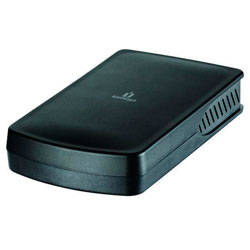
Iomega Select 1Tb USB drive
Mark: Good LVM saw this as a Big Floppy of 512Gb when attached so it needed a bit of a
"fiddle" to get it working with eCS. Just in case anyone else needs to get
a 1Tb USB drive working with eCS(OS/2):-
- Use DFSee to wipe the boot sector completely
- Eject the USB drive
- Reattach USB drive
- Run LVM which now "sees" the size of the drive but still thinks of it as a Big Floppy
- Delete the Big Floppy partition
- Create a new Volume on the USB drive - I also changed the USB drive letter to S
- Exit LVM saving changes
- Format the new drive - I selected JFS as I will not be using the
drive with other operating systems (although I understand *nix can
read/write OS/2 JFS, possibly with a bit of fiddling on the *nix side)
Eh, Voila! 1 1Tb USB drive working fine.
Information is sent by: Peter Brown -- 2011-02-13 13:01:39
****************************************
[GoogleAdv]
|
Test the program:
|
 eSchemes - change the colors and buttons on the desktop.
|
 eCo Software was collaborating or is collaborating with the companies:
Mensys BV,
Serenity Systems International,
Parallels Studio,
Innotek GmbH
|
Ideas for the developers:
|
eCo Software supports the developers of applications for eComStation and IBM OS/2 Warp. Read more..
|
|
 |
IBM OS/2 Warp
|
|